¶ Introduction
Firewalls are a critical component of network security that regulate incoming and outgoing traffic based on predefined rules. In this solution brief, we will explore the importance of inbound and outbound rules, specifying IP addresses, ports, and protocols, in securing network infrastructures.
¶ Challenges
Network Security: Ensuring that unauthorized or malicious traffic is blocked while allowing legitimate traffic is a constant challenge.
Application and Service Requirements: Businesses must strike a balance between security and ensuring that necessary applications and services can function effectively.
Complex Network Topologies: In modern networks, there are diverse devices and network segments, making rule management complex.
Adaptation to Evolving Threats: As threats evolve, firewall rules must be regularly updated to remain effective.
¶ Solution: Firewall Rules and Policy
¶ Inbound and Outbound Rules
Utilize Access Control Lists (ACLs) to specify allowed or denied IP addresses, ports, and protocols for both inbound and outbound traffic.
|
|
Inbound Rules |
Outbound Rules |
|---|---|---|
| Rule-Based Configuration |
Specify rules that dictate which external sources are permitted to access internal resources |
Control which internal devices can communicate with external resources |
| Port-Based Filtering |
Define which external ports are allowed access to specific internal services |
Regulate which internal applications can use specific ports for external communication |
| Protocol Filtering |
Define rules to allow or deny specific protocols such as TCP, UDP, ICMP, and others |
|
¶ Stateful Inspection:
- Implement stateful inspection to monitor the state of active connections, allowing the firewall to make informed decisions on permitting or blocking traffic.
¶ Logging and Monitoring:
- Regularly review logs to identify unusual traffic patterns or unauthorized access attempts.
- Set up real-time alerts for suspicious activities.
¶ User and Group-Based Rules:
- Implement rules that consider the user or group identity to manage access based on authentication.

¶ Benefits of Exium's Cyber Gateway Firewall
Firewall inbound and outbound rules, specifying IP addresses, ports, and protocols, are foundational to network security. By carefully crafting and managing these rules, organizations can maintain a robust defense against threats, facilitate business operations, and ensure data security. Implementing these rules as part of an overall security strategy is essential for safeguarding modern network infrastructures. Benefits of Exium's Cyber Gateway Firewall are listed below:
|
Enhanced Network Security |
Granular Control |
Adaptability |
Compliance |
Improved Performance |
| Define and enforce specific rules to filter both inbound and outbound traffic, reducing the attack surface. | Allows for precise control over what is allowed and what is denied, enhancing network security without disrupting necessary operations. |
Easily adapt to evolving threats and changing business needs by modifying rules as necessary. |
Help meet regulatory compliance requirements by controlling data flows and access to sensitive information. | Streamline network traffic, reducing latency, and ensuring a more efficient network. |
¶ Configuring Cyber Gateway Firewall Outbound Rules
Outbound rules control traffic initiated from within your network or system that is leaving toward external destinations — such as the internet or another network segment.
These rules determine which applications, protocols, and destination ports internal devices are allowed to use when sending traffic outside the network. Outbound control is essential for preventing unauthorized communication, limiting data exfiltration, and ensuring only legitimate traffic leaves the environment.
Local Firewall Rules: Applies to traffic that stays at the location, typically East-West LAN traffic. These rules are outbound firewall rules for inside-out access. It controls which internal devices can communicate with external resources.
¶ Configuring Site specific (CGW) Firewall Rules
To Configure Central Firewall Rules, follow the steps below:
- Navigate to the MSP admin console -> Client Workspace
- Click on Sites in the left menu bar → Local Policies
- Select Firewall tab → Select multi-interface gateway from drop down → Click on Add Policy
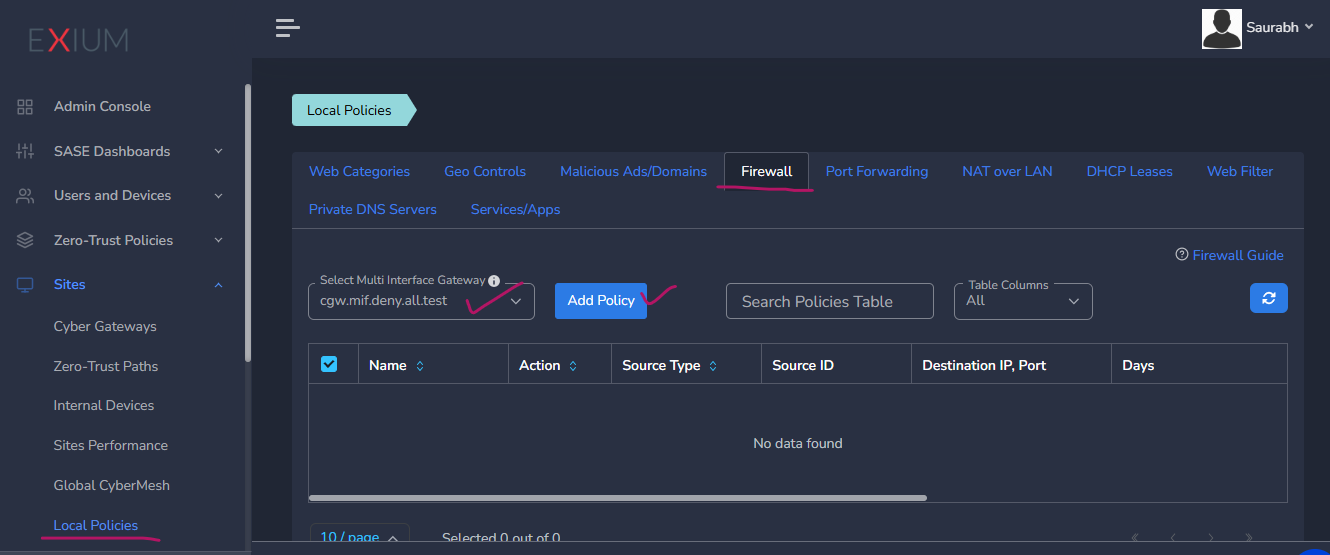
- Enter a Name for the policy
- Select Source Type, if applicable to all traffic then leave it with All value
- If Custom or LAN option selected, then provide source IP or subnet
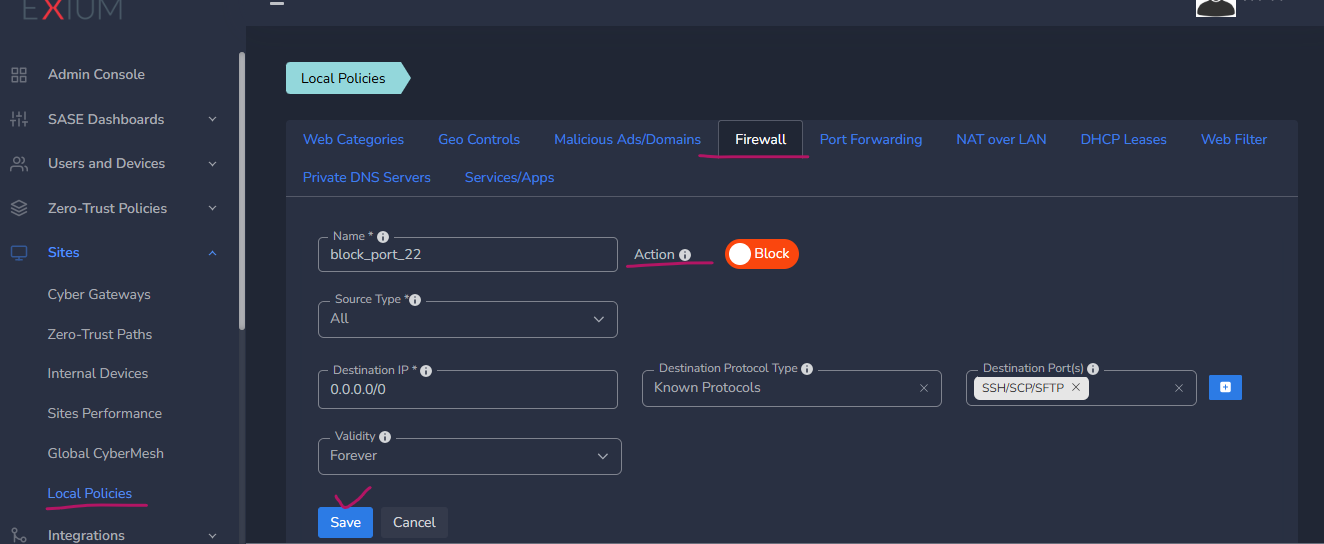
- Select Allow or Block
- Provide Destination IP address or subnet you like to apply the rules to. (0.0.0.0/0 for all destinations)
- Select Destination Protocol Type and Destination Port(s)
- If it is a known protocol, then you can select it from drop down list in Destination port(s). You can select multiple ports.
- For Custom TCP/UDP destination protocol type, provide destination port(s). After every port entry (press space or return key on keyboard)
- Select Validity as per requirement
- Click on Save.
Below example shows how to configure outbound Firewall rule to block SSH/SCP/FTP (port 22) access to any destination.
¶ Configuring Cyber Gateway Firewall Inbound Rules
Firewall inbound rules specify that which external sources are permitted to access internal resources. It defines which external ports are allowed access to specific internal services. Inbound rules control traffic coming into a system or network, typically from external (e.g., WAN or Internet) sources.
It can be achieved by implementing port forwarding. Port forwarding is a NAT (Network Address Translation) mechanism that forwards traffic arriving at a public IP and port to a private IP and port inside your network. It is how you expose internal services (e.g. a web server/application) to the outside world.
Please check Port Forwarding on CGW site document for more details.