Audience: MSP administrators, IT managers, and end customers using NETGEAR Exium SASE with Device Posture Check (DPC) enabled.
Purpose: Explain what the device posture score means, why it matters for Zero Trust access, and how to raise it.
¶ 📖 At a Glance
NETGEAR Exium continuously inspects every managed endpoint and assigns it a Device Posture Score between 0 and 100. That score, combined with workspace-level must-have requirements, determines whether the device is allowed to reach corporate resources — or is blocked at the SASE gateway until it is brought into compliance.
💡 The short version
A healthy device gets in. A risky device is held at the door. The score tells you, in one number, how risky the device is right now — and the breakdown tells you exactly what to fix.
¶ 🧭 Why Device Posture Matters for Zero Trust
Zero Trust replaces the old "trusted network" model with a continuous rule: never trust, always verify. Network location no longer grants access. Identity does — and so does the health of the device carrying that identity.
A compromised laptop with a valid SSO session is still a compromised laptop. If an attacker has reached the endpoint, they have inherited every permission that user holds the moment the device connects. Posture checks are the control that closes this gap.
¶ Posture as the third pillar of Zero Trust
Zero Trust access decisions combine three independent inputs:
- Identity — who is asking? (verified through SSO / MFA)
- Context — where, when, and from what network is the request originating?
- Device Posture — is the endpoint carrying that identity actually safe to trust right now?
When all three line up, the user gets full access. When device posture is weak, access is narrowed or denied — even for a known user from a normal location. When posture fails a must-have, access is blocked outright.
¶ What posture checks prevent
| Risk | Without DPC | With DPC |
|---|---|---|
| Unpatched OS exploited by ransomware | User's session compromised, lateral movement begins | Device blocked until patches applied |
| EDR / antivirus disabled by user or malware | Malware runs uninhibited on a trusted endpoint | Device flagged, access revoked until EDR restored |
| Personal laptop with no enterprise controls accessing CRM | Sensitive data exfiltrated to an unmanaged device | Connection refused — device fails must-have policy |
| End-of-life Windows or macOS version | Known unpatched CVEs exploitable indefinitely | Device flagged until OS is upgraded |
⚠️ Without device posture, identity-based access controls are necessary but not sufficient. Phishing or credential theft on a healthy device is recoverable. The same attack on a compromised device is a breach.
¶ 🧮 How the Score Is Calculated
The Device Posture Score is a weighted composite of multiple security pillars, each measuring a different aspect of endpoint health. The exact pillar weights and detection rules are tuned continuously, but the structure is straightforward.
¶ The pillar model
The score is built from eleven independent pillars, each measuring a different aspect of endpoint health. Each pillar is scored 0–100 based on its own evidence, then combined into a single weighted average. After the weighted score is computed, must-have checks are applied as a final gate — any unmet must-have forces the final score to zero regardless of how the pillars performed.
¶ What each pillar checks
Compares the endpoint's settings against an industry benchmark (CIS / vendor hardening guides). Looks at firewall configuration, password policy, screen-lock timeout, audit logging, BitLocker / FileVault status, and so on. A device set up with defaults will score lower than one explicitly hardened.
Cross-references installed software and OS version against published CVE feeds. Critical and high-severity vulnerabilities pull the score down more aggressively than medium or low. A single unpatched RCE in a widely targeted product can outweigh dozens of low-severity findings.
Looks at how current the endpoint is with vendor security updates — Windows hotfixes, macOS updates, Linux package security advisories. Devices that haven't received an update in weeks score lower than those patched within the last few days.
Modern, supported operating systems score full marks. End-of-life or unsupported versions (Windows 7/8, macOS older than current-minus-two, deprecated Linux distros) score zero — they cannot receive security patches and present an unacceptable risk surface.
Two signals combined: (a) does the endpoint have a recognized endpoint protection product installed (modern EDR scores highest, then built-in OS protection, then traditional AV-only, then nothing); and (b) has the platform detected actual malware or rootcheck alerts on this device in the last 30 days? Both factors matter — protection installed and protection working.
Tracks unexpected changes to sensitive system files and configuration locations. A flood of recent FIM events suggests tampering, malware persistence, or sloppy admin behavior — all of which lower the score.
Counts alerts triggered by external threat-intel feeds matching this device's activity in the last 30 days. A device whose traffic or files keep matching known-bad indicators is treated as elevated risk.
Counts high- and critical-severity SOC alerts attributed to this endpoint. Repeated triggers from hunting playbooks are a strong signal something is wrong, even when no single alert was confirmed malicious.
Counts distinct MITRE ATT&CK techniques observed on this device. A device exhibiting many different attacker behaviors is more suspicious than one with a single noisy alert source.
Volume metric — total high-severity events from this device. Acts as a complement to the more selective pillars above.
Is the endpoint connected and reporting? Devices that haven't checked in for hours or days are partial blind spots. Long-disconnected or never-connected devices score zero on this pillar regardless of how healthy they were when last seen.
¶ Weighting and renormalization
Pillars carry different weights — for example, vulnerability detection and configuration assessment carry more weight than a single alert-count pillar.
Missing data does not penalize the device. If a pillar can't be evaluated (for example, the agent hasn't reported syscheck data yet), it is excluded and the remaining pillars are renormalized to 100%. A device evaluated on 7 of 11 pillars is scored fairly against those 7.
📐 In plain terms: the score reflects what the platform actually knows about the device. As more telemetry arrives, the score becomes more representative — not lower.
¶ Must-have policy — the hard floor
Beyond the weighted score, each workspace can require certain must-haves — non-negotiable controls. Two categories today:
- EDR/AV (endpoint protection) — at least one approved endpoint product must be present and active. The workspace specifies the approved list; the device passes if any one is detected.
- MinOS (minimum operating system version) — the device's OS must meet or exceed a specified baseline (for example, Windows 11 22H2 or later, macOS Sonoma or later).
If a device fails any applicable must-have, its score is forced to 0 regardless of how well it performed on the weighted pillars. This is the floor: a missing must-have is a blocker, not a number-to-be-averaged-away.
Must-haves are matched by category to OS family. An EDRAV must-have applies to every device (Windows, Mac, Linux all need endpoint protection). A Windows MinOS must-have applies only to Windows devices — a Mac in the same workspace ignores it.
¶ 📈 Reading the Score
¶ Bands
| Band | Score | Meaning | Typical Access Treatment |
|---|---|---|---|
| 🟢 Strong | 80 – 100 | Healthy, well-managed device. Most controls in place. | Full access |
| 🟡 Acceptable | 60 – 79 | Generally healthy with one or two gaps to close. | Full access — flagged for follow-up |
| 🟠 At Risk | 40 – 59 | Multiple gaps; meaningful security exposure. | Access narrowed — sensitive apps may be blocked |
| 🔴 Critical | 1 – 39 | Severe exposure — multiple pillars failing. | Access heavily restricted |
| ⛔ Blocked | 0 | Must-have failure or no usable telemetry. | Access denied |
Bands shown above are recommended defaults. Workspace administrators can configure their own thresholds in the Exium admin console.
¶ Where to see the score
A score is computed for every Exium-managed endpoint and is visible in:
- The Device Posture dashboard in the Exium admin console — workspace overview, sortable by score
- The per-device drill-down — full pillar breakdown showing which controls passed, which failed, and which weren't yet evaluated
- The daily MSP report (delivered by email) — summary tables plus pillar detail for the lowest-scoring devices
¶ 🛠️ How to Improve a Device's Score
The pillar breakdown tells you exactly which controls are dragging the score down. Address them in roughly this order — biggest impact first.
¶ Step 1 — Clear any must-have failure
A must-have failure is a hard zero. Nothing else matters until it is resolved.
- Confirm the workspace's required endpoint product is installed on the device.
- Verify the service is running (not just installed) —
Get-Service WinDefendon Windows,systemctl statuson Linux, Activity Monitor on macOS. - For Microsoft Defender on Windows 11, ensure tamper protection has not disabled the engine.
- If a different EDR was previously installed, confirm it has been cleanly uninstalled — leftover services from a removed product won't satisfy the requirement.
- Check the device's current OS version in the device drill-down.
- Apply the latest feature update — Windows Update, Software Update on macOS, distribution upgrade on Linux.
- If the device's hardware cannot support the required version (common with older Windows hardware that can't run Windows 11), plan a hardware refresh or move the user to a different workspace with relaxed requirements.
- Allow the device to check in again — the score will recompute within minutes.
¶ Step 2 — Reduce the vulnerability and patch backlog
Vulnerability detection and patch status together carry significant weight. Two practical actions cover most of the ground:
- Enable automatic OS updates. This single setting addresses the patch pillar and a large portion of the vulnerability pillar simultaneously.
- Audit the application inventory. Removing rarely-used software with old CVEs is faster than patching it. The Exium drill-down shows which products contributed to the CVE count.
💡 Tip: A laptop with five outdated browsers and three legacy plug-ins will score much worse than one with a single, current browser. Application minimalism pays off.
¶ Step 3 — Harden the configuration
Configuration assessment rewards explicit hardening:
- Turn on the host firewall and verify the default-deny posture
- Enforce screen-lock and password policy through MDM or Group Policy
- Enable full-disk encryption (BitLocker / FileVault / LUKS)
- Enable system audit logging at the appropriate level
- Disable unused services and protocols
A configuration baseline applied via MDM lifts every device in the workspace at once and is usually the highest-leverage investment.
¶ Step 4 — Keep the agent connected
The IT Hygiene pillar measures whether the endpoint is reporting at all. Devices that haven't checked in for over a week lose substantial points and may also trigger must-have-related alerting.
- Ensure the SASE agent service starts on boot
- Verify it isn't being blocked by another security product
- Investigate any device that has been disconnected longer than the workspace's stale-device threshold
¶ Step 5 — Investigate alert-driven pillars
If threat intelligence, threat hunting, MITRE, or malware-detection pillars are pulling the score down, alerts are firing on this device. These are not score-tuning problems — they are incident response signals. Open the device in the admin console, review the most recent alerts, and engage your SOC if anything looks credible.
🚨 Don't try to "fix the score" on an alert-driven pillar by silencing the rule. The pillar is doing its job — telling you a device needs attention. Investigate first, tune detection second.
¶ ❓ Frequently Asked Questions
¶ Why did a device's score change overnight without anything happening on the endpoint?
Scores are recomputed continuously. Several non-endpoint events can move a score:
- A new CVE was published affecting software already installed on the device → vulnerability pillar drops
- Threat-intel feed added new indicators → threat intelligence pillar drops if there was matching activity
- Workspace administrator added or tightened a must-have → previously-passing devices may now fail
- The agent finished a backlogged scan and reported new findings
The drill-down shows which pillars changed since the last computation.
¶ A device shows "no EDR or AV detected" but Defender is clearly running. Why?
On Windows 10/11, Microsoft Defender Antivirus is a built-in OS service and does not appear in the installed-programs list that the agent enumerates. Detection rules look first at package inventory, then fall back to OS-family heuristics. If a Windows device has the AVMD must-have selected and shows as failing despite Defender running, ensure tamper protection has not silently disabled the engine — and verify with Get-MpComputerStatus in PowerShell.
¶ Can I configure my own pillar weights or must-haves?
Must-haves are configured per workspace through the admin console. Pillar weights are platform-managed today — they reflect industry consensus on relative risk weighting and are tuned by the NETGEAR Exium security team. If your environment has a strong case for a different weighting, contact your account team.
¶ A device has score 0 with status "musthave_failed" but everything looks healthy. What do I check?
In order of likelihood:
- MinOS mismatch — the OS version the agent reports doesn't meet the workspace requirement. Check the device drill-down for
agent_os_namevs the required MinOS shortname. - EDR not in inventory — the EDR is installed but not enumerated. See the Defender FAQ above.
- Stale must-have list — the workspace lists a deprecated shortname. Open workspace settings and re-save the must-have list.
¶ What happens during a major OS upgrade — will my fleet temporarily drop?
Typically no. The OS-version pillar awards full credit to current-minus-one and current-minus-two for several months after a new release ships. Patch status temporarily dips during the upgrade window and recovers as devices complete the update.
¶ How does device posture relate to user identity?
They are independent controls evaluated together at access time. A trusted user on a failing device is denied. An untrusted user on a healthy device is also denied. The healthiest combination — known user, known healthy device, expected context — is the only one that gets unrestricted access. Anything else is narrowed or blocked.
¶ 🖥️ Configuring Device Posture in the Admin Console
The screenshot below shows the Device Posture configuration page in the Exium admin console. From here, workspace administrators control the three levers that drive the score: which must-haves are required, what the access-decision threshold is, and whether device posture enforcement is active for this workspace.
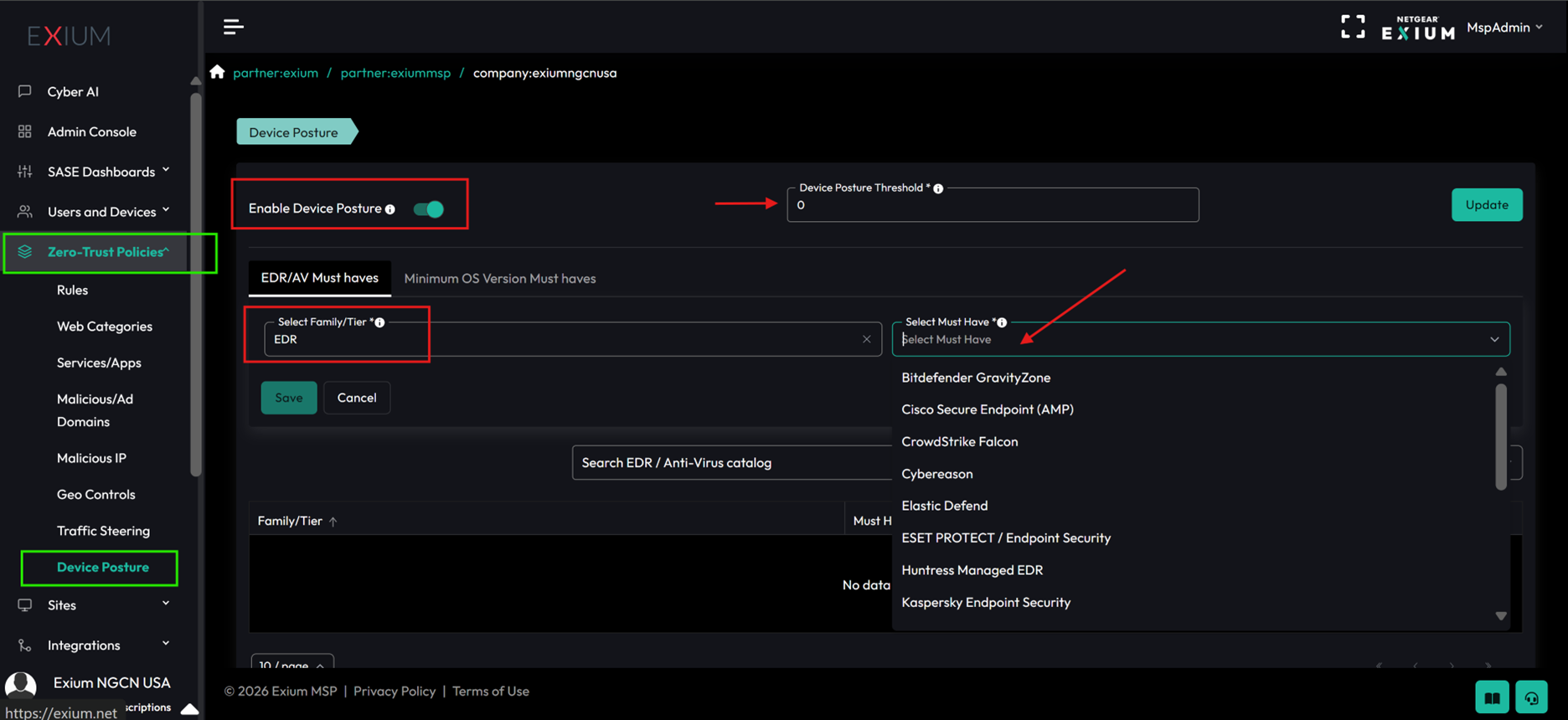
Key controls visible above:
- Enable Device Posture — turn enforcement on or off for the workspace. With it off, scores are still computed and visible in reports, but access decisions ignore them.
- Score threshold — the minimum score a device must reach for access to be granted. Devices scoring below this value are blocked at the SASE gateway.
- Must-haves — the EDRAV and MinOS shortnames required for every applicable device. Select from the catalog of approved endpoint products and minimum operating system versions.
💡 Start permissive. When first turning on Device Posture for a customer, set the threshold low (e.g.,
1) so that only must-have failures block access. Watch the daily report for two to four weeks to understand the fleet's natural score distribution, then raise the threshold to a value that catches risky devices without disrupting healthy ones.
¶ 🚀 Getting Started Checklist
For MSPs onboarding a new customer workspace:
- Confirm the SASE agent is deployed to every endpoint that will need corporate access
- Select the workspace's required EDR/AV must-haves in admin console → Device Posture
- Select the required MinOS baseline per OS family
- Configure the access policy thresholds (which bands get full access, which are narrowed)
- Subscribe the right stakeholders to the daily MSP posture report
- Walk customer admins through the device drill-down view
- Schedule a 2-week review to triage the initial low-scoring devices
✅ Start permissive, tighten progressively. Begin with must-haves only and the score visible-but-non-blocking. After two to four weeks, once the fleet has stabilized, enable score-based access enforcement.
¶ 📬 Support
The Device Posture functionality is continuously refined. For configuration questions, custom requirements, or to discuss workspace-specific tuning, reach out to the NETGEAR Exium team at support@exium.net or book a session through Microsoft Bookings.
Last reviewed: May 2026. Pillar definitions and must-have categories are updated as the platform evolves; consult the admin console for the authoritative current state of your workspace.